Digital Signage Studio: a self-built SaaS CMS for real-time screens
- Client
- Digital Signage Studio
- Year
- 2025
- My role
- Product · Front-end architecture · React PWA · Realtime UI
- Stack
- React, TypeScript, Tailwind CSS, Zustand, Supabase, Node.js
- Type
- SaaS · CMS · Realtime
A self-built SaaS platform for digital signage: a drag-and-drop CMS for designing screens, playlists and schedules, paired with a resilient PWA player that keeps every screen showing the right thing, in real time.
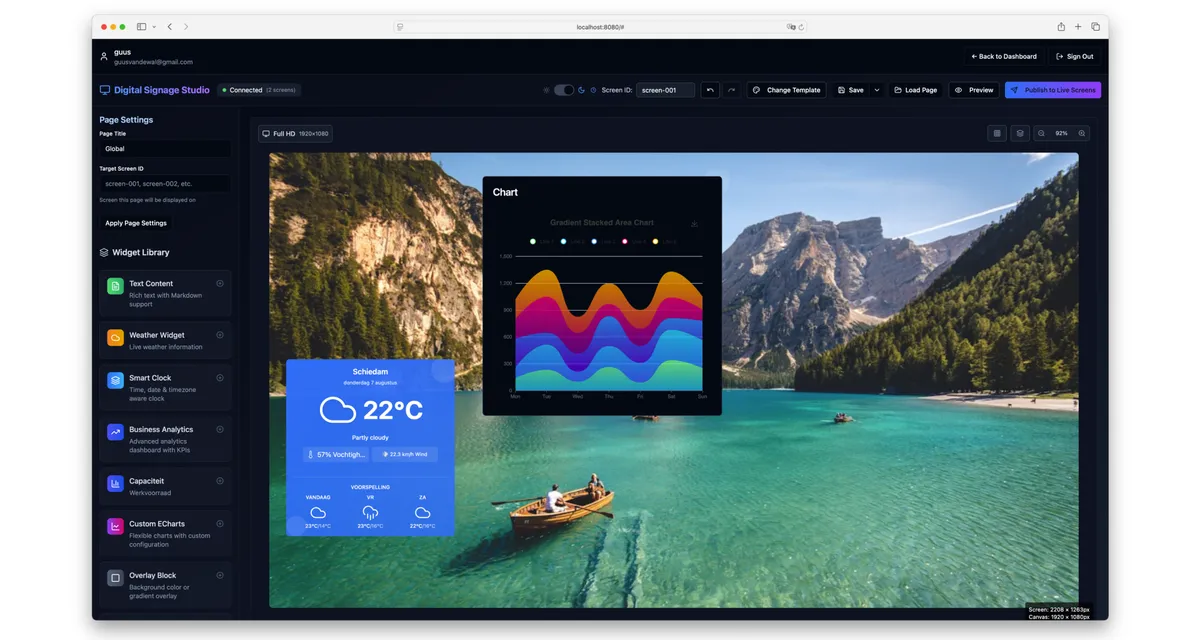
Most digital signage tools force a bad trade-off: either a rigid template picker with no room to design, or a fully custom build that needs a developer for every content change. Digital Signage Studio is my answer to that: a CMS where non-technical users design screens visually, while data like weather, transit times, KPIs and queues stays live without anyone touching the page again.
The front-end is a React and TypeScript PWA with an API-driven architecture, split cleanly into two apps: an admin environment for building content, screens, playlists and schedules, and a lightweight player whose only job is to render pages reliably on whatever device is bolted to the wall. Zustand handles global state, with a deliberate separation between UI state, application state and the data that comes back over the API, so a flaky connection or a slow widget never corrupts what the editor thinks the page looks like. Supabase and a Node.js API layer sit underneath for auth, storage and the realtime plumbing that pushes a published page out to every connected screen.
Admin forms like widget configuration, scheduling and screen pairing all run on React Hook Form, and every REST integration is written assuming the network will misbehave: retries, fallbacks and visible error states rather than a widget silently going blank. The project also carries its own quality bar: Vitest/Jest for logic and component tests, browser-level checks for the editor's drag-and-drop interactions, CI/CD for deployment, and WCAG accessibility and performance treated as part of the component architecture rather than a pass at the end.
The editor is a full drag-and-drop canvas: widgets snap onto a 1920×1080 stage, get resized, layered and styled, and the whole page saves, previews and publishes to any paired screen by ID. Whether it's a queue number, an internal announcement or a KPI, the person building the page decides exactly what appears where, without touching a line of code.
The widget library covers what real signage deployments actually need: rich text, a timezone-aware clock, live weather, train and tram departures, KPI and capacity tiles, video, photo, background overlays, even an ambient full-screen effect for lobby screens. A custom ECharts widget lets you wire up your own API or static data source for anything bespoke, with a built-in AI assistant that turns a plain-language description into a working chart config instead of a raw options object.
Expertise used
Built by Guus van de Wal, Senior Front-end Developer & UI Engineer.